
Changing your Club Penguin name is done by submitting a username change request through the official Newcp support portal, then waiting for manual moderation approval. Players cannot update their username directly from account settings. The process requires choosing a name that meets Newcp's naming rules, submitting a support ticket, and monitoring your dashboard for a response. This guide walks you through every step, explains why verification takes time, and tells you exactly what to do if your request gets rejected.
How to change your Club Penguin name: what you need first
Before you submit a name change request, gather everything you need. Going in unprepared is the most common reason players hit unnecessary delays.
Account credentials you need:
- Your current username or P-ID number (the temporary number assigned at registration)
- Your account password
- Access to the email address linked to your account
- Your account's membership status, if applicable
Naming rules you must follow:
Newcp enforces strict username standards. Usernames must be 4–12 characters, use only standard alphanumeric characters, and avoid special characters like $ or @. Names that fail these rules are rejected automatically. That means a name like "Cool$Penguin" or "Ice@Bird99" will never pass moderation, no matter how many times you submit it.
Overly complex names with unusual formatting are filtered out before a human reviewer even sees them. Keeping your name simple and clean gives it the best chance of approval.

Pro Tip: Pick two or three backup names before you submit your ticket. If your first choice gets rejected, you can file a new request immediately without losing time brainstorming.
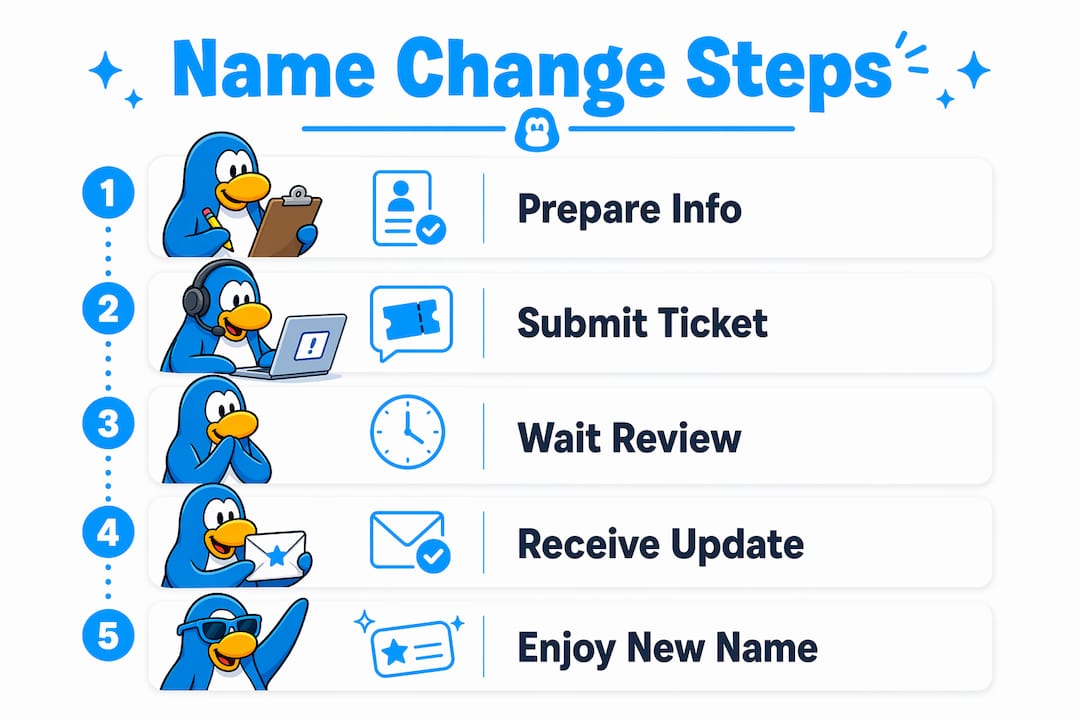
Step-by-step: how to submit a name change request
The official process for changing your Club Penguin username runs through the Newcp support portal. Follow these steps exactly to avoid common mistakes.
-
Go to the Newcp support portal. Open your browser and navigate to the official Newcp support page. Do not use third-party sites or Discord servers claiming to handle name changes.
-
Log in with your current credentials. Enter your current username or P-ID and your password. If you forgot your password, use the account recovery option before proceeding.
-
Locate the username change request form. Once logged in, find the support ticket section. Look for a category labeled "Account Help" or "Username Change." The exact label may vary, but the ticket system is the correct channel.
-
Fill out the form completely. Enter your current username, your proposed new name, and a brief reason for the change. Double-check that your proposed name follows the 4–12 character rule and uses only letters and numbers.
-
Submit the ticket. Click submit and wait for the confirmation message. A ticket number will appear on screen. Write it down or screenshot it.
-
Monitor your support dashboard. Log back into the support portal regularly to check your ticket status. Status updates appear there before any email notification arrives.
Pro Tip: Submit your ticket during off-peak hours, typically early morning on weekdays. Moderation teams are smaller during weekends, so tickets submitted then may sit longer before review.
The entire submission takes under ten minutes when you have your information ready. The wait for approval is the longer part of the process, and that is covered next.
Why does username verification take so long?
Verification delays are the most frustrating part of changing your Club Penguin username. Understanding why they happen makes the wait easier to manage.
Username verification delays come from small, community-driven moderation teams that review every name manually. This is a deliberate security measure, not a technical glitch. Manual review keeps inappropriate names out of the game and protects younger players in the community.
Verification can take two weeks or more during high-traffic periods. Player surges, such as after a major game update or school holiday, flood the support queue and push wait times higher. That timeline is normal and does not mean your ticket was lost.
What to do while you wait:
- Check your support dashboard every two to three days, not every few hours
- Avoid submitting a second ticket for the same request
- Keep your login credentials accessible in case staff need to verify your identity
- Continue playing on your P-ID name in the meantime
"Players who monitor their support dashboard are more effective at resolving username issues than those who panic and file multiple tickets. Patience and a single ticket are the recommended approach during verification delays." — Community guidance from long-time Newcp members
Repeatedly submitting tickets for the same issue slows the process down rather than speeding it up. Each duplicate ticket creates extra work for the moderation team and pushes your original request further back in the queue.
What happens if your username request gets rejected?
A rejected username request is not the end of the road. It means your proposed name did not pass moderation, and you need to choose a different one.
Common reasons for rejection:
- The name contains special characters like @, #, $, or %
- The name is shorter than 4 characters or longer than 12
- The name includes inappropriate language or references
- The name is already taken by another player
- The name mimics a staff or moderator title
If your username is rejected, your account keeps its temporary P-number name until you file a new ticket with a different proposed name. The rejection does not lock you out of the game or your account.
Your next steps after a rejection:
- Review the rejection reason shown on your support dashboard
- Choose a new name that avoids the issue that caused the rejection
- Open a fresh support ticket with the new proposed name
- Write a polite, brief message explaining that your previous request was rejected and that you are submitting a revised name
The tone of your ticket matters. Moderation teams are made up of volunteers and community members. A respectful message gets a faster, friendlier response than a frustrated one. Treat the process the way you would want to be treated if you were the one reviewing hundreds of tickets.
Pro Tip: Test your proposed name against the 4–12 character rule and the alphanumeric-only requirement before submitting. A quick mental check takes five seconds and prevents another round-trip through the queue.
Key Takeaways
Changing your Newcp username requires a valid name, a single support ticket, and patience while the moderation team completes manual verification.
| Point | Details |
|---|---|
| No self-service name change | Username updates require a support ticket, not an in-game settings change. |
| Follow naming rules strictly | Names must be 4–12 characters, alphanumeric only, with no special characters. |
| One ticket per request | Submitting multiple tickets slows verification. File one and monitor the dashboard. |
| Delays are normal | Verification can take two weeks or more during high-traffic periods. |
| Rejection is recoverable | A rejected name keeps your P-ID active. File a new ticket with a revised name. |
What I have learned from watching players navigate name changes
The single biggest mistake I see players make is treating the support ticket like a vending machine. They submit a request, wait two days, submit another, then a third, and wonder why nothing is moving. Every duplicate ticket adds to the moderation team's workload and pushes the original request further back. One ticket, then patience. That is the formula.
The second mistake is choosing a name that was never going to pass. Players pick names with symbols, spaces, or references that break the rules, then act surprised when the request comes back rejected. Spending sixty seconds checking your proposed name against the 4–12 character and alphanumeric rules before submitting saves days of waiting.
What I genuinely respect about Newcp's approach is that the moderation is human and community-driven. That is rare. Most platforms automate this entirely, which means borderline names slip through and the community suffers. The slower, manual process at Newcp produces a cleaner, safer environment. The wait is the price of that safety, and it is worth it.
My honest advice: pick a name you actually want to keep for a long time, check it against the rules, submit once, and check your dashboard every few days. The process works when you work with it.
— C
Getting official support for your Newcp username

The official hub for all username help is Newcp. The support portal there is the only legitimate place to submit a name change ticket, check your request status, and find updated guidance on naming rules. Third-party sites and social media channels cannot process name changes on Newcp's behalf.
The Newcp site also hosts community forums and help pages where experienced players share tips on choosing names that pass moderation quickly. If you are stuck on a P-ID name or waiting on a pending ticket, those community spaces offer practical advice while you wait. Start at the official site and use the support portal as your first and only stop for account help.
FAQ
Why is my Club Penguin name a number?
New players receive a temporary P-ID number as a placeholder name during registration. This number stays until your username change request is reviewed and approved by the moderation team.
How long does a Club Penguin name change take?
Verification typically takes up to two weeks or longer during high-traffic periods. Small moderation teams review every request manually, which is why the timeline varies.
Can I change my Club Penguin name more than once?
Newcp does not publicly list a limit on name change requests, but each request requires a separate support ticket and goes through the same moderation process.
What characters are allowed in a Club Penguin username?
Usernames allow only standard letters and numbers, must be 4–12 characters long, and cannot include special characters like @, $, or #.
What should I do if my name change request is stuck?
File a formal inquiry through the support portal if your request has been pending beyond the expected timeframe. Do not submit duplicate tickets. Check your dashboard first to confirm the original ticket is still active.